Board / script / camera / recorder
- 角色
- 产品设计与设计工程(录制工作流 / GitHub 同步)
- 时间
- 2026 · production prototype, ongoing
- 平台
- Desktop Web / React / Excalidraw / GitHub
画布负责承载想法;工作台负责让这些想法被讲清楚、录下来,并继续维护。
01 / Context
不是再做一个白板
真实场景是边画边讲:同时需要分镜、提词、参考、摄像头和录制。单项工具都存在,但工作流不连续。
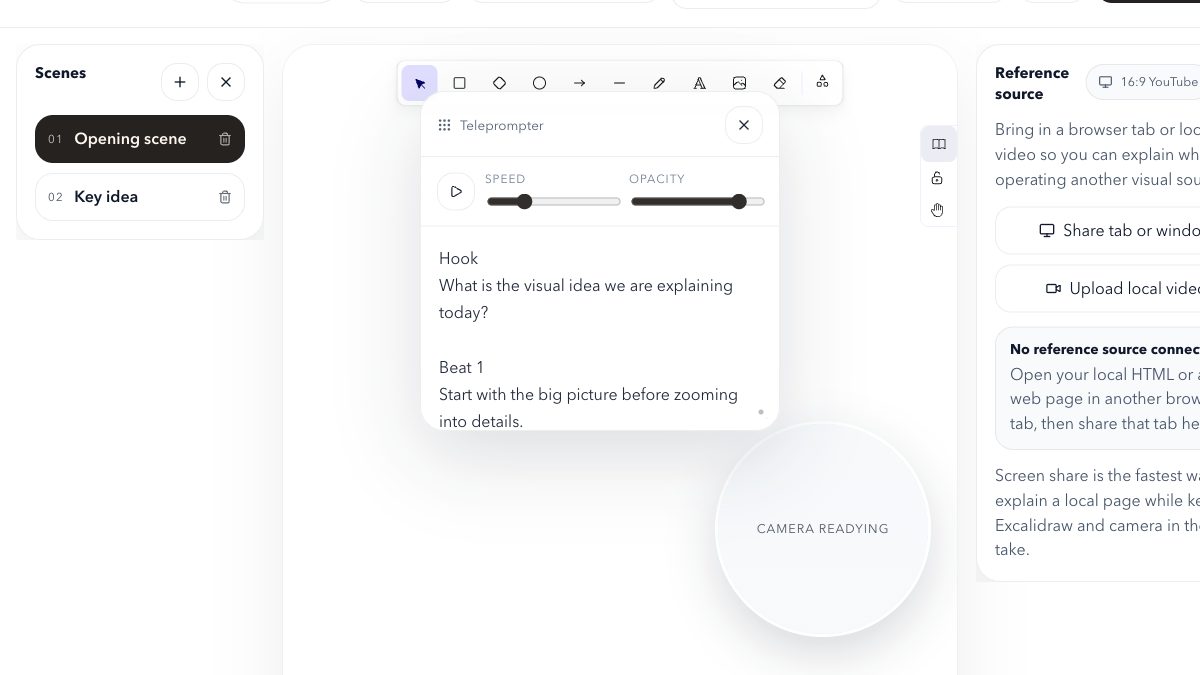
主画布保持清晰,提词、参考、摄像头与录制框按需要进入工作区。
02 / Framing
把窗口切换变成空间组织
产品边界围绕“解释一件事”,而不是围绕通用画布功能清单。
Frame / explain / record / sync
问题不是缺少单项工具,而是讲解动作被多个窗口切断。
03 / Decision
主画布是舞台,辅助层随时退场
- Scene、teleprompter、reference panel、camera bubble 和 recording frame 都可按需要进入。
- 桌面优先,移动端不假装支持不合适的录制流程。
Switchable frames
Speaking rhythm
External context
Presenter presence
Visible boundary
辅助层围绕讲解动作排布,可隐藏、可聚焦,不抢占白板主语义。
04 / Flow
从讲清楚到留得下来
Frame → Explain → Record → Sync 把即时讲解变成可以继续编辑、回拉与复用的项目。
从分镜到可继续编辑的项目
讲解不止生成视频,也留下场景结构和可继续维护的项目。
05 / Recovery
同步不是上传按钮
GitHub 配置、push、pull、restore 和 stale-client protection 共同定义恢复能力。
Private sandbox / stale-client conflict protection
真实私有仓库验证 push、pull、restore 与旧客户端冲突保护。
06 / Delivery
发布结论必须分层
本地测试与生产 canary 提供强证据;preview 域名可达性曾阻塞,因此生产通过不被写成所有基础设施都正常。
测试、构建、浏览器 smoke 和 production canary 通过;preview 可达性问题仍单独保留。
体验深描
痛点、用户故事与交互设计
这一段不讲技术栈,只讲「人在什么处境下用它、哪里卡住、我做了什么回应」。
我的痛点
这些项目都从我自己被卡住的地方开始。
- P01
每做一次产品讲解,白板、提词器、参考页面、摄像头和录屏工具要同时开五个窗口。
- P02
切窗口的那一两秒,讲解节奏就断了,观众也跟着掉线。
- P03
讲完录完,草稿、素材和录屏散在各处,下次想改就得从头再来。
- P04
无限画布适合发散,但讲解需要分镜——一张越画越满的大图,讲到后面观众找不到重点。
- P05
浏览器录屏、摄像头权限和本地草稿同步的状态散在各处,开录前要逐个确认。
用户故事
写成「作为…我想…以便…」,每条对应一个可验证的产品动作。
- US01
作为要录讲解视频的人,我想在同一个界面里边画边讲边看提词,以便全程不用切窗口。
- US02
作为讲结构的人,我想把一段讲解拆成可切换的分镜,以便观众始终知道现在讲到哪。
- US03
作为需要引用资料的人,我想在画布旁固定一个参考面板放浏览器页面或本地视频,以便边讲边对照。
- US04
作为要复用的人,我想把这次讲解的场景结构和项目文件推到自己的 GitHub 仓库,以便下次接着改而不是重做。
- US05
作为出镜的人,我想摄像头气泡和录制框选在同一层控制,以便开录前一眼确认状态。
用户体验旅程
按真实使用顺序展开:此刻在做什么 / 哪里有摩擦 / 产品怎么回应。
阶段此刻在做什么摩擦点产品回应
01Frame 搭分镜
开讲之前,先把要讲的内容拆成几个 scene。
无限画布下,讲到后半段观众已经失焦。
Scene 列表把一段讲解拆成多个可切换分镜,而不是只留一张无限画布。
02Explain 边讲边画
主画布在讲,提词器和参考面板在旁边。
辅助面板一旦常驻,就会抢走主画布的注意力。
辅助层围绕讲解动作排布,默认收起、随时可唤出、可聚焦,主画布始终是视觉主角。
03Record 录制
框选录制区域,打开摄像头气泡,开始录。
权限、设备与录制边界散在浏览器各处,容易录进不该录的部分。
录制框选、摄像头与屏幕共享收在同一层控制,边界可视、状态一目了然。
04Sync 同步留存
录完之后,把项目状态推回自己的仓库。
「录完即散」让每次讲解都变成一次性产物。
GitHub push / pull / restore 按 repo / branch / path 配置同步,并带 stale-client 冲突保护。
交互细节
决定「用起来顺不顺」的微观判断。
- 辅助层默认收起
- 提词器、参考面板、摄像头气泡都以「需要时才出现」为默认态,不常驻挤压画布。
- 录制边界可视
- 录制框选独立于窗口边界,开录前就能看清到底会录进什么。
- 分镜切换不中断录制
- scene 之间切换是产品内动作,不是切换窗口,讲解节奏得以连续。
- 移动端明确劝退
- 检测到移动设备时直接提示改用桌面,不提供半残的移动体验。
- 同步带冲突保护
- stale-client 冲突会被拦下并提示,而不是静默覆盖远端内容。
设计细节
视觉系统、状态语言与节奏上的取舍。
- 桌面优先
- 录屏、拖拽、分镜切换与参考视频都需要稳定的大画布和清晰层级,因此不为移动端妥协。
- 不重造画布
- 以成熟白板核心为底座,价值加在「讲解工作台」这一层,而不是再做一个画图工具克隆。
- presenter workspace 的语义
- 产品定位是演示工作台而非通用绘图工具,功能取舍都以「这一步是否服务讲解」为准。
- 层级克制
- 辅助能力用更低的对比度与更小的尺度承载,避免与主画布竞争视觉权重。