Feishu message → structured PromptPack
AI MUSIC / CREATIVE OPERATIONS
Music OS
A creative system spanning Feishu intake, AI generation, local processing, and album release — plus the music catalog it keeps producing.
- Role
- Owner / creative workflow design / automation engineering / music curation
- Time
- 2025-2026 · Ongoing
- Platforms
- Feishu / macOS / Music Board / NetEase Cloud Music / DistroKid
Automation carries the repetition. A person keeps the final judgment over sound, artwork, and release.
PART I / THE SYSTEM
First, the system: a music production service with a human quality gate
- This is not one script. It is a service chain spanning Feishu, generation tools, local processing, an asset board, a player, and release platforms.
- The global workbench first answers where the system is, what inventory exists, and where a person must take over.
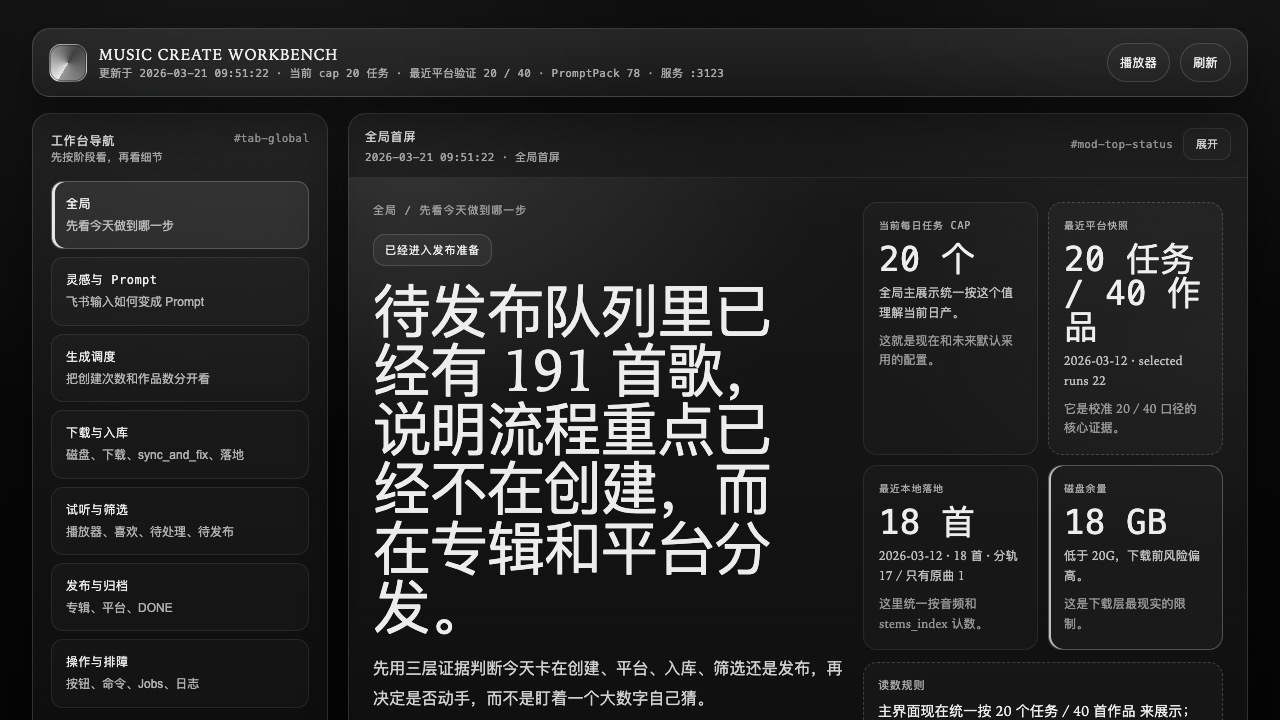
The global workbench puts intake, generation, acquisition, curation, release, and operations on one service map so the operator can see where today’s work is blocked.
Read pending requests and write status
Acquire, stem, voice, and persist
Liked / needs work / ready to publish
Artwork gate → platform-specific release
IDEA → ASSET → CATALOG → RELEASE
The system manages a lifecycle from idea to releasable asset, not a single generation action.
03 / Intake & Feedback
Feishu is both the low-friction entry and the cross-device feedback loop
- Spoken ideas become structured PromptPacks with theme, voice, structure, and style.
- Windows tasks report progress, disk, process, and log locations back to the same channel.
- Notification is a control mechanism that lets the operator safely leave the execution device.
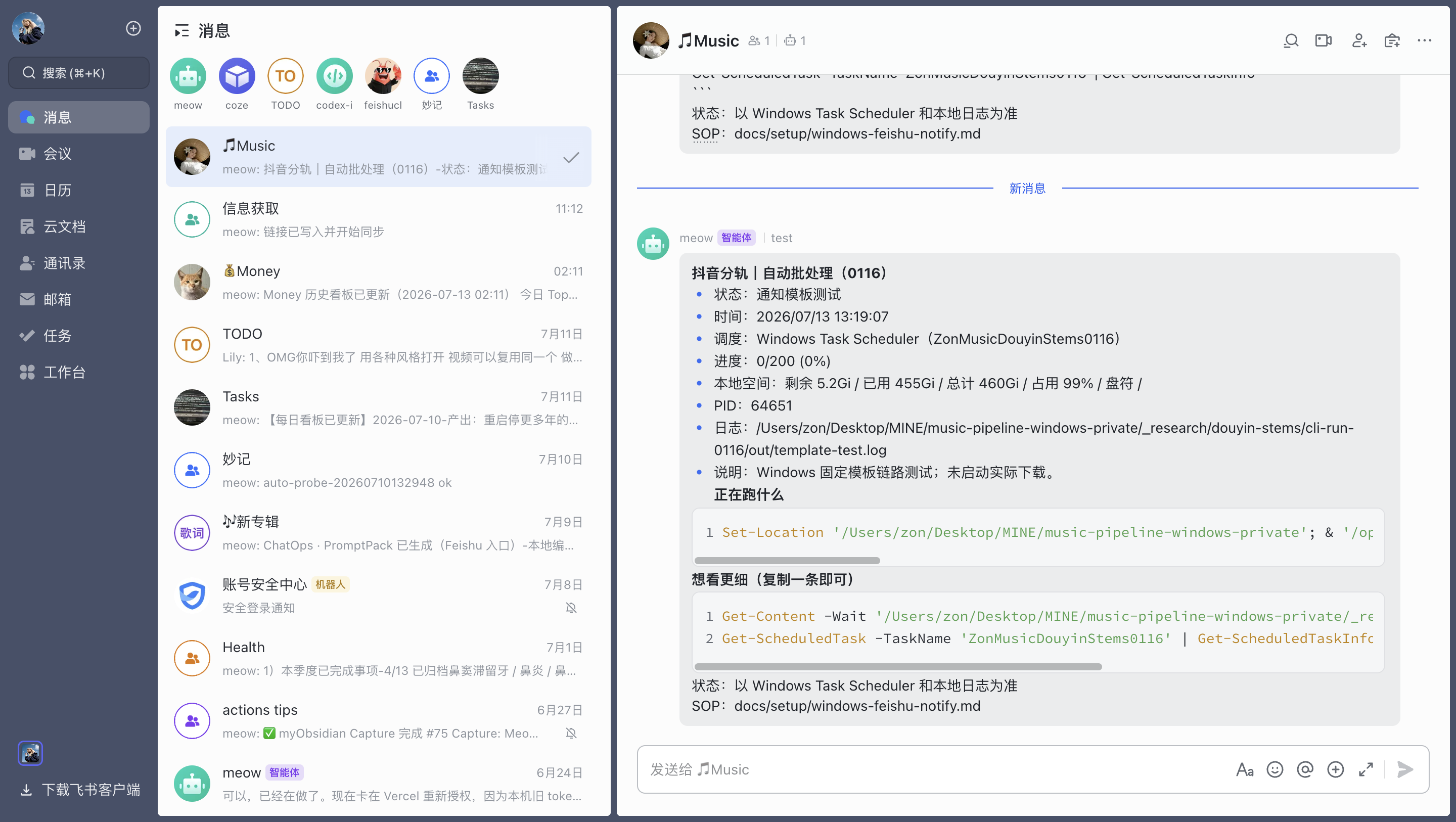
A Windows task reports status, progress, disk capacity, process, and log location to Feishu so the operator can leave the machine without losing control.
Low-friction input becomes a traceable request covering theme, voice, structure, and style.
04 / Production
Automatic, assisted, and manual are observable responsibility boundaries
- AUTO: queue consumption, acquisition, stems, base processing, archiving, and notification.
- SEMI: album assembly, metadata, platform forms, and exception handling.
- MANUAL: listening judgment, artwork, final selection, and release approval.
- The runtime console keeps background jobs, logs, and stop controls visible.
Machines carry repeatable, verifiable steps.
The system prepares; a person confirms and handles exceptions.
Subjective quality is not disguised as a metric.
AUTOMATION BOUNDARY
Semi-automation is a deliberate human quality gate, not an unfinished state.
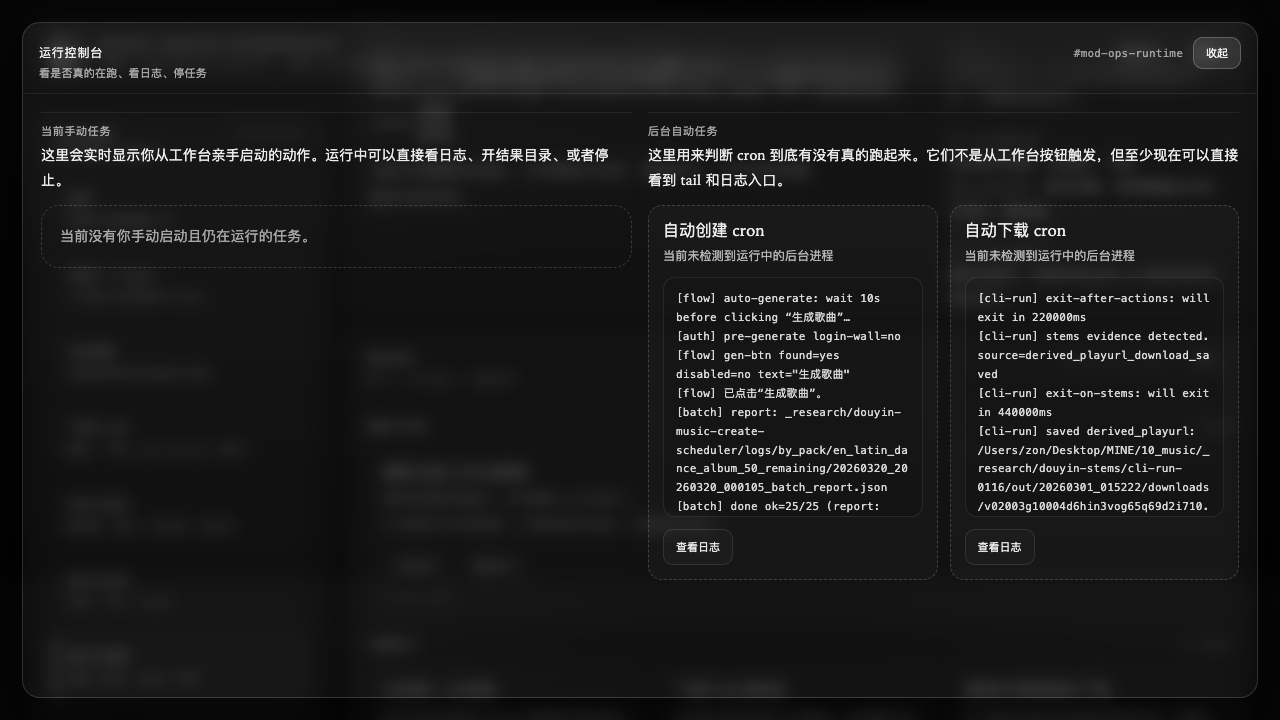
The operations console separates current manual work from scheduled automation and exposes logs, result folders, and stop controls instead of hiding automation in a black box.
05 / Curation
The local player handles decisions; the board exposes the whole catalog
- Air Final Player loads local audio by path and keeps listening beside lifecycle actions.
- Music Board reads audio, lyrics, and configuration together to expose type, style, and state.
- A person can delete, like, repair, or mark ready; artwork and final sonic preference are not delegated to automated scoring.
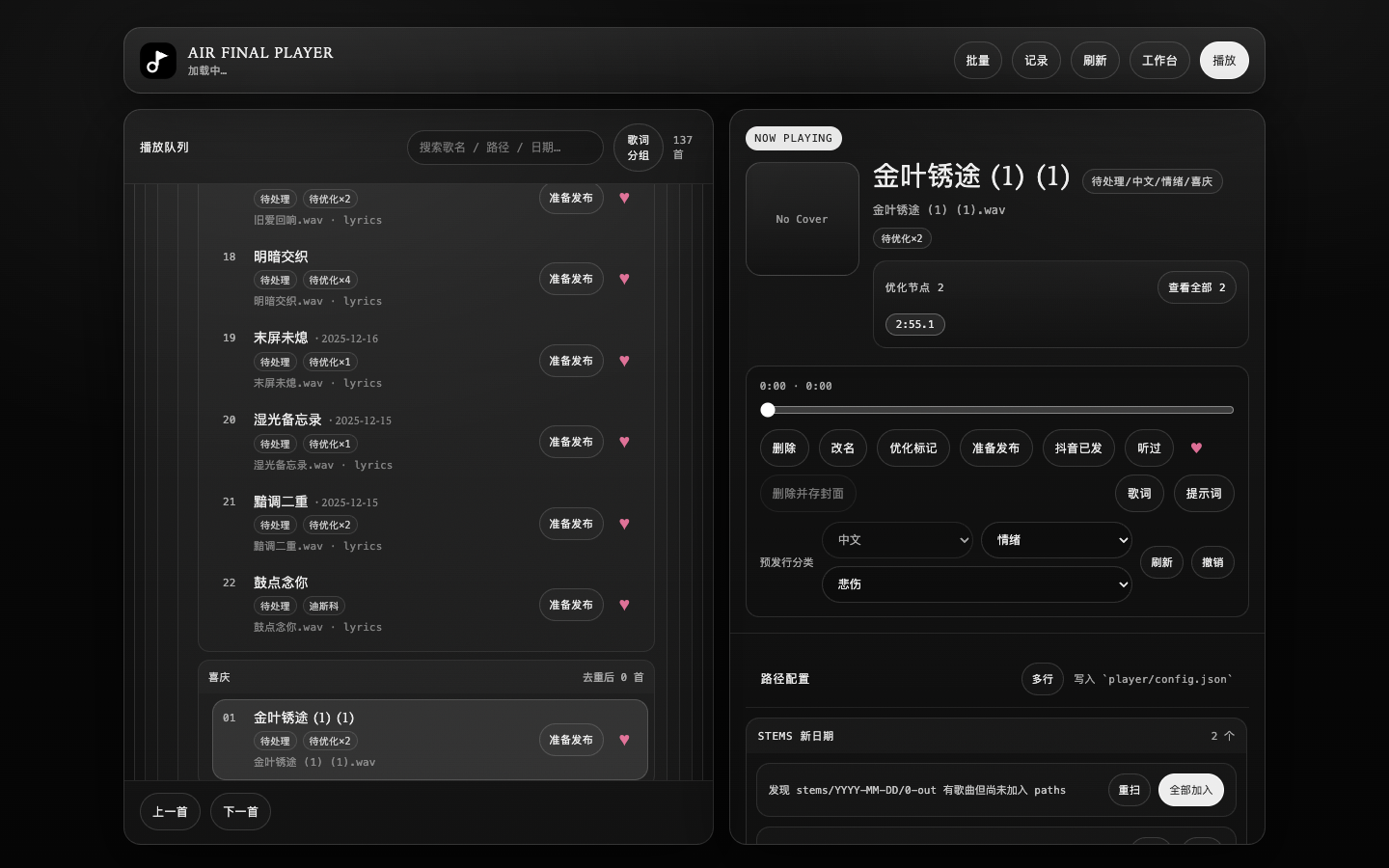
The local player is an operations surface, not a duplicate catalog: listening, deletion, renaming, repair flags, and release states live together.
Music Board is the shared browsing, search, and listening surface once assets reach human review.
Audio, lyrics, and configuration move together; lifecycle state matters more than folder count.
06 / Release
Inventory becomes albums; adapters handle the last mile
- At useful inventory size, the system assists titles, album naming, folders, and metadata.
- NetEase serves release and backup; DistroKid provides broader distribution.
- Bulk operations are assisted while submission, recovery, and artwork remain human decisions.
Transcode, album draft, lyrics, and post-release sync.
Album CSV, metadata, and assisted bulk form filling.
Platform differences stay in adapters, with a person confirming before release.
07 / Boundary
The right end state is assisted, not unattended
- Running: intake, partial batch generation, local processing, asset board, curation, and some release.
- Partial: album assembly, artwork, and cross-platform publishing.
- Not complete: weekly inventory detection producing a full release package.
- “800+ tracks” and “about two hours saved daily” are creator-reported, not independently audited metrics.
Backed by source, directories, and run records.
Semi-automated with human quality and exception handling.
A target state, not presented as complete.
The case separates running, partial, and planned capabilities.
PART II / THE CATALOG
What the system leaves behind is a catalog people can actually hear
- The public music site presents releases, tracks, lyrics, and listening.
- It is the output layer of the production system, not the automation system itself.
- The two destinations now answer different questions: how the work is made, and what the work became.
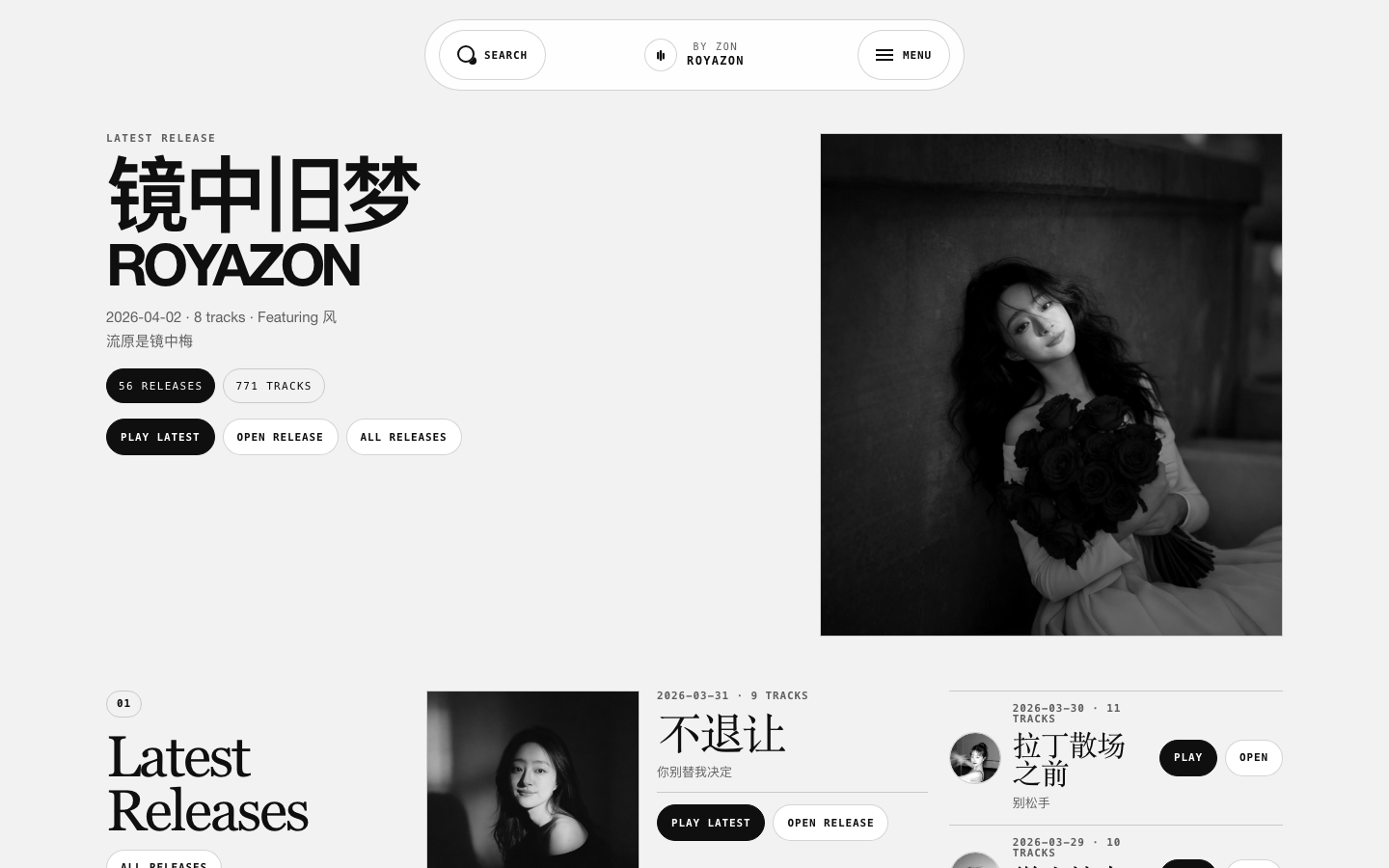
The public site is the outcome layer, presenting releases, tracks, and listening entry points produced by the system.
Experience in depth
Pain points, user stories, and interaction design
Not a tech stack section. This is about the situation people are in, where they get stuck, and what I did about it.
My pain points
Every project here starts from somewhere I personally got stuck.
- P01
Generating a track takes minutes, but downloading, splitting stems, renaming, archiving, comparing, and filling forms can eat an entire evening.
- P02
Ideas arrive when only a phone is at hand; by the time I am back at the desk, the exact flavour I wanted is gone.
- P03
Generation quota comes in windows, and nobody can sit and wait for them — a missed window wastes a day.
- P04
NetEase and DistroKid expect different metadata shapes, so one album means dozens of hand-typed fields.
- P05
Yet full automation would destroy quality — a machine cannot hear which take is good or pick the right cover.
User stories
Written as "as … I want … so that …", each mapped to a verifiable product action.
- US01
As someone with an idea on the move, I want to dictate it and get a trackable PromptPack, so ideas do not depend on being at a desk.
- US02
As a creator on limited quota, I want the system to drain the backlog whenever a window opens, so throughput continues without me.
- US03
As someone with taste requirements, I want one board to audition and mark liked / to-fix / to-release, so attention goes only to judgment.
- US04
As a multi-platform releaser, I want the system to prepare each platform's metadata and leave me the confirmation, so I stop typing dozens of fields.
- US05
As a long-term operator, I want every audio asset to carry an explicit state, so six months later I still know where a track stands.
Experience journey
In real usage order: what they are doing, where it hurts, how the product responds.
StageWhat they are doingFrictionProduct response
01Intake
Dictating a direction inside Feishu.
A manual transcription step sits between the idea and the pipeline, and most ideas die there.
ChatOps turns the dictation directly into a stateful PromptPack in the queue — no admin console required.
02Generate
A quota window opens while requests are still queued.
Watching for quota windows is not realistic, and a missed window wastes a day.
Queue-driven generation drains the backlog when the window opens, with visible processing state.
03Process
Analysis, stem separation, vocals, and timeline work.
Purely mechanical work that still consumes the most time.
Python / shell / Reaper chain the processing steps, and idle machines pick up local post-production.
04Curate
Auditioning takes, fixing flaws, assembling an album.
"Does this sound good" and "which cover" cannot be delegated to a machine.
Music Board carries liked / to-fix / to-release states. The system prepares; the aesthetic call stays human.
05Release
Preparing albums and metadata for NetEase and DistroKid.
Different field conventions on each platform, dozens of manual entries, easy to get wrong.
Per-platform forms and album material are prepared for confirmation, and post-release state is written back to the asset.
Interaction details
The micro-decisions that make it feel fluid or clumsy.
- AUTO / SEMI / MANUAL labels
- Every step declares which tier it belongs to, so it is obvious at a glance where a human is needed.
- State as entry point
- Liked / to-fix / to-release are not tags but work queues — tapping a state moves straight into the next action.
- Dictation enqueues
- A Feishu message is the entry point; no separate back office has to be opened.
- Audition before metadata
- The board plays first and shows fields second, because the order of judgment sets the order of layout.
- Failures are not silent
- A broken processing step returns the asset to its previous state instead of losing it in the queue.
Design details
Tradeoffs in the visual system, state language, and pacing.
- State-driven asset lifecycle
- The interface is organised around asset state from intake to release, not around a generate button.
- An explicit human boundary
- System preparation and human decision are visually separated, so automation never impersonates taste.
- Dense board layout
- The local asset board fits a batch on one screen for fast auditioning and filtering.
- Platform differences absorbed inside
- Per-platform adapters absorb field differences so the interface keeps one operating vocabulary.